


Plastic engravings are becoming increasingly popular – for product design, electronic labels, signs, prototypes, and personalized gifts, for example. Whether it's acrylic, ABS, coated plastics, or laminate sheets, achieving clean results requires the right engraving tool for plastic. However, with the wide selection of devices available in 2026, it's not easy for beginners to find the right starting point.
In this guide, we introduce four tools and machines for plastic engraving and highlight their respective strengths and weaknesses. This will help you decide which solution suits your projects, budget, and planned production volume.

In this article:
- Part 1: The 4 best plastic engraving tools: Pros and cons
- Tool 1: Laser engraving machine
- Tool 2: CNC engraving tools
- Tool 3: Pin marking machine
- Tool 4: Manual and electric hand tools
- Part 2: How do I choose the right engraving tool for plastic?
- FAQ: Frequently asked questions about plastic engraving tools
Part 1: The 4 best plastic engraving tools: Pros and cons
Engraving tools for plastic work on different principles. Some remove material mechanically, while others use heat or impact force. Understanding their respective functions can help prevent plastic from melting, warping, or resulting in unclean engravings.
Below are the four most common types of plastic engraving machines in 2026.
Tool 1: Laser engraving machines
Laser engraving machines remove the surface of the plastic with a focused light beam, creating precise markings. They are among the most popular plastic engraving machines for several reasons:
A major advantage is their high level of detail. Lasers produce fine lines, small fonts, and complex patterns that would be difficult to achieve with hand tools. This makes them particularly suitable for logos, QR codes, serial numbers, and intricate designs.
Lasers also deliver consistent results for recurring tasks. Once the settings are established, each engraved workpiece looks almost identical. This reduces errors in larger quantities. Since the process is contactless, thin plastics can also be engraved without applying mechanical pressure.
However, not all plastics are suitable for laser processing. Some materials can melt or release harmful fumes. Therefore, always check material compatibility and ensure effective extraction.
Advantages:
- Highly detailed results
- Consistent quality in series production
- Contactless process without tool wear
- Ideal for complex designs
To consider:
- Higher acquisition costs
- Not suitable for all plastics
- Appropriate settings and good extraction required
Tool 2: CNC engraving tools
CNC engraving machines process plastic with rotating cutters. They are often used in workshops and are particularly suitable for thicker plastic sheets.
CNC machines are a good choice for deep engravings and cuts, especially in hard plastics like acrylic. They can process large workpieces and thick materials where low-power lasers reach their limits.
A disadvantage is the lower level of detail. The quality depends on the diameter of the cutter, making very small fonts difficult to implement. In addition, CNC machines can be noisy, require more time for delicate work, and necessitate regular cutter changes.
Advantages:
- Suitable for thick, hard plastics
- Good results for deep engravings
- Reliable for extensive work
To consider:
- Less detailed than lasers
- Cutter wear can affect quality
- Slower for detailed designs
- Higher maintenance requirements
Tool 3: Pin marking machine
Pin marking machines mark plastic by rapidly striking the surface with a carbide pin. The resulting dots form letters, numbers, or other characters.
This method is often used for industrial markings such as serial numbers. Pin marking machines are robust and work particularly well on hard plastics.
However, the optical quality is limited. The method is hardly suitable for decorative motifs or detailed graphics. Noise generation can also be disruptive in workshops.
Advantages:
- Robust and durable markings
- Good for industrial identification markings
- Little preparation required
To consider:
- Less aesthetically pleasing for decorative applications
- No complex designs possible
- Relatively high noise generation
Tool 4: Manual and electric hand tools
This group includes hand gravers, electric engraving pens, rotary tools, and hot knives. They are popular with hobbyists because they are inexpensive and readily available.
For small, spontaneous jobs, these tools can be sufficient. However, the result depends heavily on experience and a steady hand. Achieving consistent depth or straight lines is difficult, especially on smooth surfaces. Heated tools can also cause the plastic to melt.
Advantages:
- Inexpensive and readily available
- Good for simple DIY projects
- Mobile and flexible to use
To consider:
- Varying quality of results
- Only suitable to a limited extent for fine details
- Unsuitable for larger quantities
Comparison table: Tools and engraving machines for plastic
| Tool type | Precision | Repeatability | Speed | Required experience | Best suited for |
|---|---|---|---|---|---|
| Laser engraving machine | Extremely high | Excellent | Fast | Low | Logos, patterns, series production |
| CNC engraving tool | Medium to high | Good | Medium | Medium to high | Deep cuts, thick plastics |
| Pin marking machine | Low | High | Fast | Low | Industrial markings |
| Hand tool | Low | Low | Slow | High | Simple DIY projects |
The comparison shows that laser engraving is particularly well-balanced among the four methods: it combines high precision and speed with consistent results and diverse design possibilities. Those who value clean, professional engravings and efficient series production would be well advised to choose a laser engraving machine in 2026.
But which laser engraving machine is best suited for plastic?
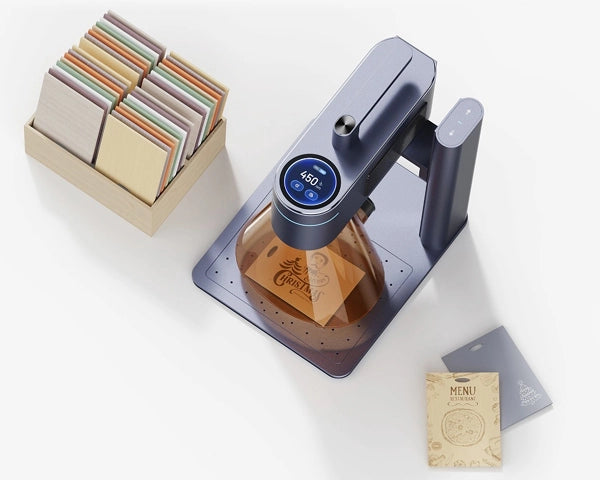
For plastic engravings, the LaserPecker LP4 is a convincing choice for both private and professional use.
First, the LP4 works with extreme precision. Laser engraving allows for very fine lines, tiny fonts, and detailed designs that are difficult to achieve with hand tools. This is ideal for brand logos, labels, and decorative motifs.
Second, the LP4 is suitable for complex designs. Textures, gradients, and even images can be engraved directly onto suitable plastics. This opens up creative possibilities that many other tools do not offer.
Third, the LP4 is easy to use. Unlike traditional engraving techniques that require a lot of practice, the LP4 is software-controlled. Import your design, adjust the settings, and start engraving – even without years of experience.
Part 2: How do I choose the right engraving tool for plastic?
When choosing a suitable plastic engraving device, it's not just about price and brand name. Plastics react differently to heat, pressure, and mechanical processing. Therefore, it is crucial to know the specific material precisely.
1. Material type
Not all plastics can be engraved in the same way. Acrylic, ABS, PETG, and coated plastics can produce clear, high-contrast markings with a laser when the settings are appropriate. Softer materials like PVC or plastics of unknown composition, however, can melt, smoke, or deform under heat. Particularly important: Heating PVC releases toxic gases that can endanger people and equipment.
Laser engravers should therefore not be used for PVC or similar materials. CNC machines or other non-thermal methods can be safer alternatives, although appropriate protective measures are also required here. If you want to process various laser-suitable plastics, a laser offers particular flexibility as power and speed can be adjusted to the respective material.
Consistent, repeatable results
Every engraving is based on the same digital template. This is particularly important for brand labeling, series production, and professional quality products. LaserPecker offers a re-engraving function on its touchscreen, which makes recurring workflows significantly more efficient.
2. Requirements for precision and level of detail
If you want to engrave small fonts, fine lines, serial numbers, or delicate logos, a laser is usually the best choice. Mechanical tools often reach their limits with very small details and can leave rough edges. Lasers reproduce even complex graphics and images repeatedly with high clarity.
3. Production volume and efficiency
For occasional individual projects, simple hand tools or small mechanical engraving devices may suffice. However, if you regularly engrave nameplates, control panels, or plastic tags, a laser engraving machine for plastic speeds up the workflow and ensures consistent results. Digital files also allow the same design to be reproduced any number of times without manual deviations.
4. Budget
Hand tools are inexpensive but offer limited possibilities. CNC machines have higher acquisition costs and require regular maintenance. Lasers also require a larger initial investment but can pay off in the long run: they save time, reduce material waste, and prevent errors – especially in small workshops and businesses.
5. Extraction and safety
When engraving plastic, fumes can be generated, especially under heat. Laser engraving machines therefore require suitable extraction or a filter system. However, since they work without contact, there is no risk of slipping with a tool. Devices like the LaserPecker LP4, in conjunction with an effective exhaust system, enable controlled and clean processing of suitable plastics.
FAQ: Frequently asked questions about plastic engraving tools
1. Can I laser engrave any plastic?
No, not all plastics are suitable for laser engraving. Materials such as acrylic and ABS can often be processed well, provided their exact composition is known and approved for the laser used. However, you should never laser PVC and vinyl, as this can release dangerous fumes. Always check the manufacturer's specifications before processing and first perform a test on a small sample piece.
2. Laser engraving or mechanical engraving: Which is more cost-effective?
Laser engraving machines are usually more expensive to purchase, but they work faster and can be operated efficiently once set up.
Mechanical engraving tools often cost less initially, but involve more manual effort and costs for maintenance, tool changes, and cleaning. For larger quantities, laser engraving can be more economical in the long run. The high repeatability also reduces waste.
3. How deep can a laser engrave plastic?
Laser engravings on plastic are usually rather superficial. The achievable depth depends on the plastic, the laser type, and the number of passes. Lasers are ideal for clear surface markings, but not always the best solution for deep recesses. Multiple passes can deepen the engraving, but must be carefully coordinated to prevent the material from melting or deforming.
4. How do I prevent plastic from melting or deforming during engraving?
Reduce the laser power, increase the speed, and use air assistance – if suitable for the material and the device. Always test the settings first on a scrap piece. Good air circulation helps to dissipate heat. With correctly adjusted parameters, a clean engraving is created without deforming the plastic.
Conclusion
In 2026, there are numerous ways to engrave plastic, but not every tool is suitable for every task. CNC machines, pin marking systems, and hand tools all have their place. However, laser engraving machines offer particularly high precision, speed, and scalability.
If you want to engrave suitable plastics with high quality, little manual effort, and diverse design options, the LaserPecker LP4 laser engraver is a strong choice. From prototypes to personalized individual pieces to series parts, laser engraving has established itself as a modern standard for individual plastic products.


